> For the complete documentation index, see [llms.txt](https://help.usejimo.com/docs/llms.txt). Markdown versions of documentation pages are available by appending `.md` to page URLs; this page is available as [Markdown](https://help.usejimo.com/docs/publish/target-and-publish.md).

# Overview: how targeting works

The settings that decide when, where and to whom an experience shows, how they combine, and the order to set them in.

Every experience has a **Target & Publish** panel. It holds the settings that decide what starts the experience, on which pages, for which users, and how often, and the environment you pick when you publish decides on which domains it runs.

**You will have at the end:** a clear picture of what each setting filters, and which ones apply to the experience you are publishing.

***

## The settings

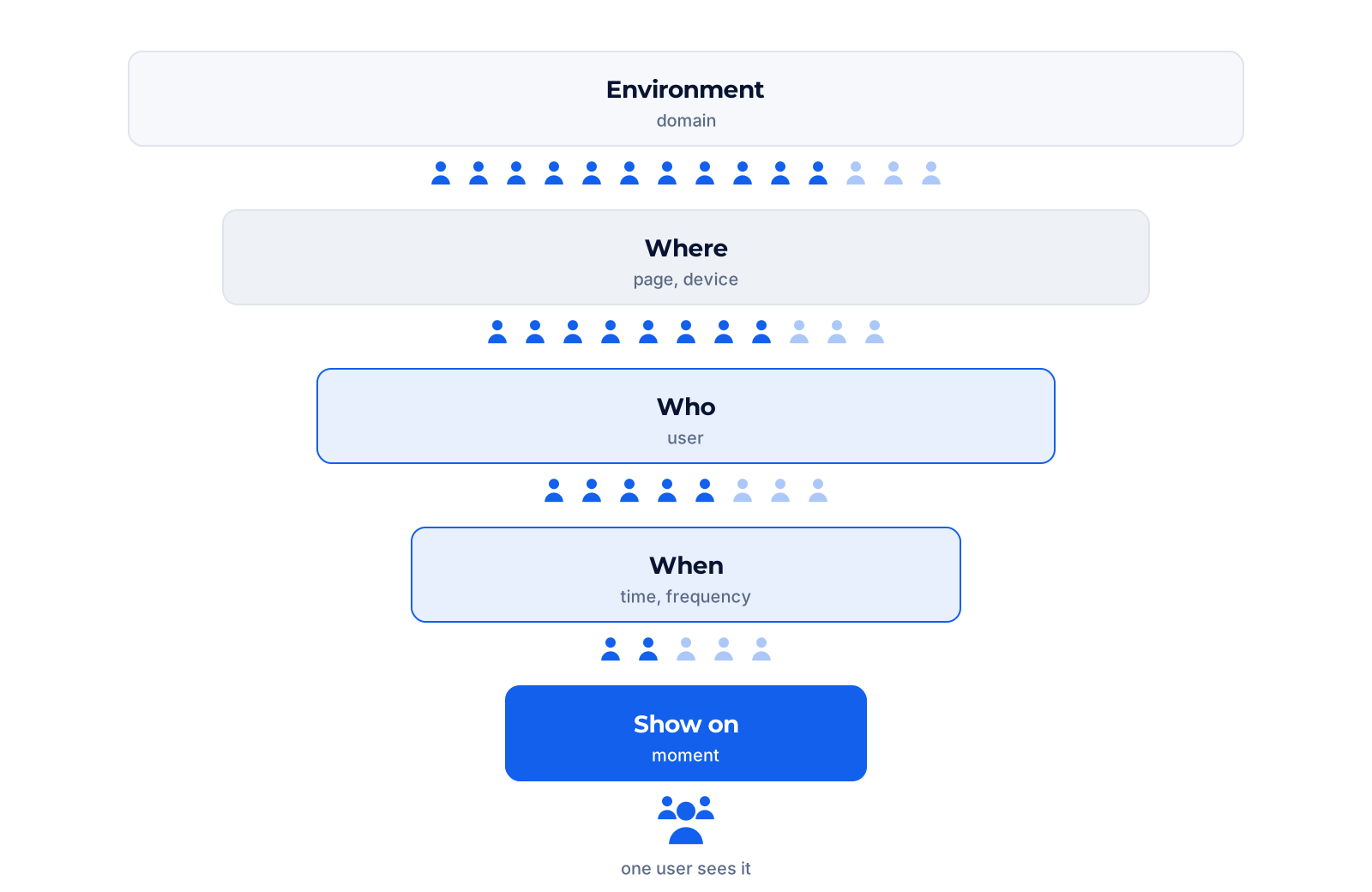
<figure><img src="https://2794860263-files.gitbook.io/~/files/v0/b/gitbook-x-prod.appspot.com/o/spaces%2FKzAcDWQbK1gKbpra7bkb%2Fuploads%2Fw3wrdbBoruMy6Io5MryO%2FB-01-targeting-layers.png?alt=media" alt="Five filters from wide to narrow: Environment (domain), set at publish with the Env dropdown, then Where (page), Who (user), When (time) and Show on (moment), set per experience in Target &#x26; Publish, before the experience shows"><figcaption></figcaption></figure>

A user sees an experience only when every setting lets them through. Each card opens the page of its setting.

<table data-view="cards"><thead><tr><th></th><th></th><th data-hidden data-card-target data-type="content-ref"></th><th data-hidden data-card-cover data-type="files"></th></tr></thead><tbody><tr><td><strong>Show on</strong></td><td>What starts it: opening or leaving a page, an event, a link you share, your own code, or another experience.</td><td><a href="/docs/publish/trigger-on-the-right-spot-show-on.md">Show on: trigger at the right moment</a></td><td><a href="https://2794860263-files.gitbook.io/~/files/v0/b/gitbook-x-prod.appspot.com/o/spaces%2FKzAcDWQbK1gKbpra7bkb%2Fuploads%2FHuzVw2b4NXvTYYHaasLW%2FB-c01-show-on.png?alt=media&amp;token=4bdf0a1f-d6f8-4976-8165-1c6bbf689283">B-c01-show-on.png</a></td></tr><tr><td><strong>Where</strong></td><td>On which pages and devices. Rules read the path, the query string and the hash of the address.</td><td><a href="/docs/publish/target-specific-urls-domains-where.md">Where: target pages and domains</a></td><td><a href="https://2794860263-files.gitbook.io/~/files/v0/b/gitbook-x-prod.appspot.com/o/spaces%2FKzAcDWQbK1gKbpra7bkb%2Fuploads%2FZLxmjoXNU7FBixjrg1SU%2FB-c02-where.png?alt=media&amp;token=74c652d4-26b2-4dc7-a220-9c502ea1737b">B-c02-where.png</a></td></tr><tr><td><strong>Who</strong></td><td>Which users: everyone, saved segments, or conditions built for this experience only.</td><td><a href="/docs/publish/target-right-people-who.md">Who: target the right users</a></td><td><a href="https://2794860263-files.gitbook.io/~/files/v0/b/gitbook-x-prod.appspot.com/o/spaces%2FKzAcDWQbK1gKbpra7bkb%2Fuploads%2FRrwatLtaE0kPMw6ZDqhb%2FB-c03-who.png?alt=media&amp;token=44f44d6a-26e8-4df3-bc9c-3ab309f3e965">B-c03-who.png</a></td></tr><tr><td><strong>When</strong></td><td>From and until when, how often per user, and which experience wins when several compete.</td><td><a href="/docs/publish/trigger-at-the-right-time-when.md">When: schedule and frequency</a></td><td><a href="https://2794860263-files.gitbook.io/~/files/v0/b/gitbook-x-prod.appspot.com/o/spaces%2FKzAcDWQbK1gKbpra7bkb%2Fuploads%2F5r2wcVFYJE9ERFkA7eYI%2FB-c04-when.png?alt=media&amp;token=17c318f8-2b37-43f3-8549-ebc0ad72aed8">B-c04-when.png</a></td></tr><tr><td><strong>Goal</strong></td><td>What counts as success, and the A/B test for tours and modals.</td><td><a href="/docs/publish/mesure-outcomes-goal.md">Goal: measure outcomes</a></td><td><a href="https://2794860263-files.gitbook.io/~/files/v0/b/gitbook-x-prod.appspot.com/o/spaces%2FKzAcDWQbK1gKbpra7bkb%2Fuploads%2FWZ75eQHEhX0CjItlsdGj%2FB-c05-goal.png?alt=media&amp;token=603708e6-783f-4f55-abcc-2e520ada6b7d">B-c05-goal.png</a></td></tr><tr><td><strong>Boost</strong></td><td>Changelog posts only: attach a banner, a modal or a snippet to a post.</td><td><a href="/docs/publish/increase-visibility-boost.md">Boost: promote a changelog post</a></td><td><a href="https://2794860263-files.gitbook.io/~/files/v0/b/gitbook-x-prod.appspot.com/o/spaces%2FKzAcDWQbK1gKbpra7bkb%2Fuploads%2FJZ48X3qqotwOIal2Z9WH%2FB-c06-boost.png?alt=media&amp;token=bd604f3e-4a2f-4ec7-9a38-ebf28180e01b">B-c06-boost.png</a></td></tr></tbody></table>

All six are set per experience in Target & Publish. The environment is the one setting outside the panel: you pick it in the **Env** dropdown when you publish, see [Environments and domains](/docs/getting-started/your-workspace/environments-and-domains.md). The environments themselves are managed in [Settings > Environments](/docs/settings/environments.md).

Before you publish, the panel sums up every setting in one place:

<figure><img src="https://2794860263-files.gitbook.io/~/files/v0/b/gitbook-x-prod.appspot.com/o/spaces%2FKzAcDWQbK1gKbpra7bkb%2Fuploads%2FhriQp2EBG5GII3CxjlZ9%2FB-s01-target-and-publish-panel.png?alt=media&amp;token=3214570b-a2b0-4274-b8f6-07f7fbeb9d35" alt="Target Experience summary of a modal: Show on set to On page opening, after 2 seconds; Where to On Desktop, On filtered URLs; Who to Example, VIP User (9 users selected); When to Now, No expiration, Show once, Priority 10; Goal to Experience completion; a preview of the modal on the right"><figcaption></figcaption></figure>

## Defaults of a new experience

A new experience starts with these values. Leaving them as they are means "on every page, for everyone, once".

| Setting     | Default                                                            |
| ----------- | ------------------------------------------------------------------ |
| Show on     | On page opening, no delay                                          |
| Where       | On all pages, desktop only                                         |
| Who         | All users                                                          |
| When        | Show once per user, priority 0, starts at publication, no end date |
| Environment | All domains, until you pick an environment                         |

{% hint style="warning" %}
**Desktop only by default.** Add tablet and mobile in [Where](/docs/publish/target-specific-urls-domains-where.md#devices) if your users are there too.
{% endhint %}

## What the trigger changes

The trigger in Show on decides whether the other settings apply.

| Show on                                                       | Where (pages, devices)       | Who            | When (frequency)                               |
| ------------------------------------------------------------- | ---------------------------- | -------------- | ---------------------------------------------- |
| On page opening, On page leaving, On event, On manual trigger | Applies                      | Applies        | Applies                                        |
| On shared URL                                                 | Pages ignored, devices apply | Applies        | Shows each time the link is opened             |
| No automatic trigger                                          | Does not apply               | Does not apply | Does not apply: shows each time it is launched |

With No automatic trigger, the panel keeps only Show on and Goal. The environment always applies. See [Show on](/docs/publish/trigger-on-the-right-spot-show-on.md#which-trigger-for-which-case) to pick a trigger.

## In which order to set them

{% stepper %}
{% step %}

### Show on

Pick the trigger first: it tells you which of the next settings matter.
{% endstep %}

{% step %}

### Where

The path of the pages, and the devices. Leave the domain to the environment.
{% endstep %}

{% step %}

### Who

For a first publication, a segment that contains only you and your team.
{% endstep %}

{% step %}

### When

Frequency, dates, priority. Check rate limiting if you test several experiences in a row.
{% endstep %}

{% step %}

### Goal, then Publish

Pick what success means, then **Publish** and choose the **Env**.
{% endstep %}
{% endstepper %}

The full first-publication walkthrough, with the "publish to yourself, then your team, then everyone" routine, is in [Publish your first experience](/docs/getting-started/publish-your-first-experience.md).

## From your assistant

With the [Jimo MCP](/docs/integrations/mcp.md) connected, ask: *"Show me the display rules and the audience of the Welcome modal."* The assistant reads back the pages, trigger, frequency, priority, devices, segments and dates of the experience. More prompts in [What to ask?](/docs/integrations/mcp/what-to-ask.md)

## Verify

* Open the experience's **...** menu > **Troubleshoot** on a page of your app. The experience is listed as **Shown** or **Waiting**, not **Ineligible**.
* If it is **Ineligible**, the unmatched condition tells you which setting to check. The full checklist is in [Why my experience does not show](/docs/getting-started/publish-your-first-experience/why-my-experience-does-not-show.md).

## Go further

* [Environments and domains](/docs/getting-started/your-workspace/environments-and-domains.md): one snippet, several domains.
* [Experience links](/docs/build/actions/experience-links.md): experiences launched by other experiences.
* [Test safely](/docs/getting-started/publish-your-first-experience/test-safely.md): a test segment and the Troubleshoot tool.
* [In-app tour of Target & Publish](https://i.usejimo.com/tours?jimo_poke=41e02d12-687d-4b3e-ba68-67f57a854987): opens a guided tour of the panel in your Jimo dashboard.

<details>

<summary>Video: configure Target &#x26; Publish</summary>

A walkthrough of the panel, recorded on an earlier version: some option names have changed since, such as **On all pages**, formerly Everywhere.

{% embed url="<https://youtu.be/PKvxGQ7n_tQ>" %}

</details>

**Next page:** [Show on: trigger at the right moment](/docs/publish/trigger-on-the-right-spot-show-on.md)