> For the complete documentation index, see [llms.txt](https://help.usejimo.com/docs/llms.txt). Markdown versions of documentation pages are available by appending `.md` to page URLs; this page is available as [Markdown](https://help.usejimo.com/docs/experiences/changelog/posts/multiple-languages.md).
# Multiple Languages
This article describes how Jimo supports localization for multilingual applications.
Jimo allows displaying content in a specific language depending on the user’s browser language.
You can do it manually if you want, but we **offer an automatic translation of content** **with AI.**
***
## **Quick access**
* [Languages available](#languages-available)
* [Translate your content in your Changelog](#how-to-set-different-languages-for-a-changelog-post)
***
### Languages available
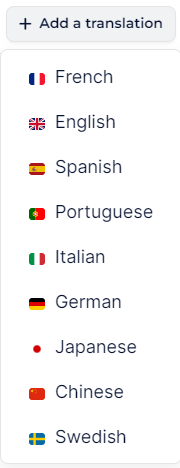
Jimo allows you to translate your content into 9 different languages. It will be automatically displayed depending on the user’s browser language.
Languages available
### How to set different languages for a Changelog post?
Jimo also allows you to show your Changelog content in multiple languages. It works the same way as for an experience, except that there isn’t yet the Smart Translate feature. (It’s coming very soon).
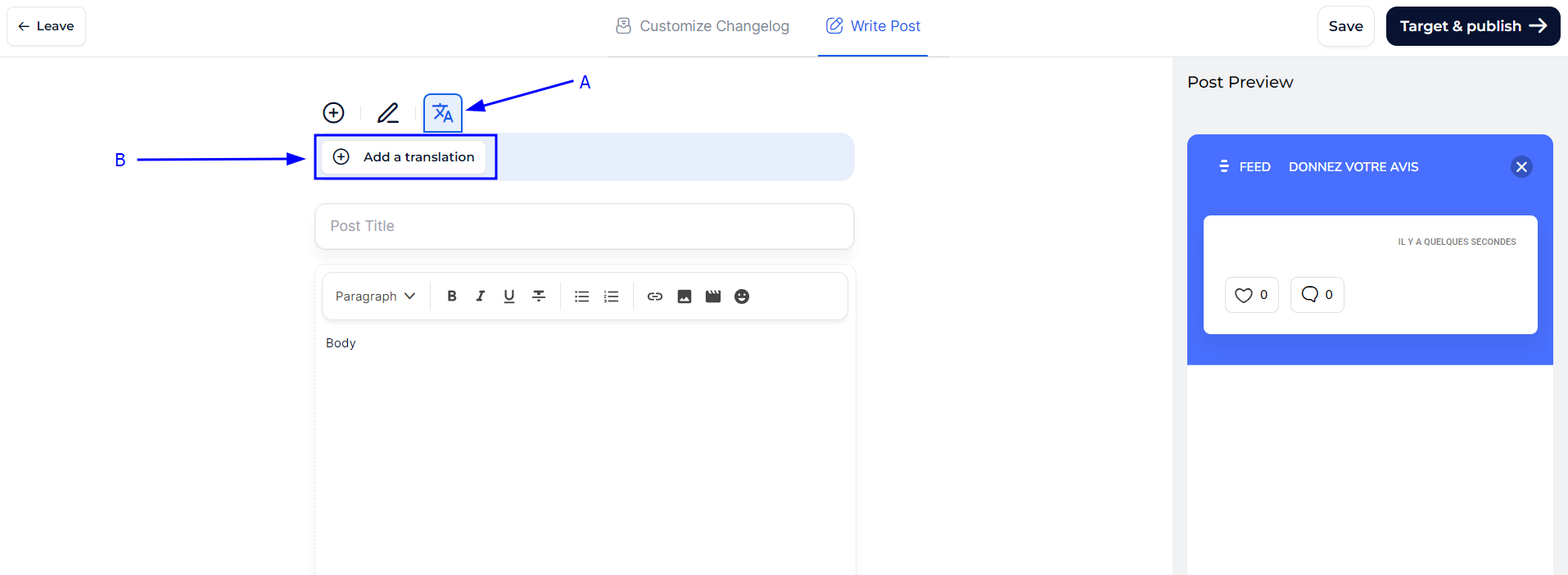
Changelog translation
* **Access the Translation Tab (A)**: This is where you switch from your default content management to the translation management interface, ensuring that every piece of information is available in multiple languages.
* **Add a Translation (B)**: Click here to start adding new translations for your changelog content. This allows you to directly input translations for titles, descriptions, and other text related to your changelogs **in a dedicated tab for each language**.
{% hint style="info" %}
In your Changelog post edition, add your different translations and they will be automatically displayed depending on the user’s browser language.
{% endhint %}